+1 740 762 6496
 +91 70189 46603


TABLE OF CONTENT
- What Is Custom LMS Development
- Ready-Made vs Custom LMS: Which One Fits You
- How Much Does Custom LMS Development Cost in the USA
- What Drives the Price Up or Down
- The LMS Features Your Users Actually Want
- AI Features That Turn a Good LMS Into a Great One
- A Quick Look at What a Real Build Feels Like
- How to Build an AI-Powered Learning Platform, Step by Step
- The Tech Stack Behind a Strong LMS
- US Rules You Cannot Skip: FERPA and Accessibility
- How Long Does Custom LMS Development Take
- Mistakes That Wreck LMS Projects
- How to Choose an Education Software Development Company
- Why Teams Pick Auspicious Soft for Education Software Development
- FAQs
Overview
- Custom LMS development gives you a platform shaped around your needs, not a template you fight with.
- US costs run from about $30,000 to $150,000 and up, based on features and AI.
- Most builds ship in 3 to 9 months.
- AI is now the heart of a modern learning platform, not a nice extra.
- Start small, launch a lean version, then grow it with real user feedback.
- The partner you pick matters more than the tech. Choose one with true education and AI work.
AI Summary:
Custom LMS development means building a learning platform made just for you, instead of renting a fixed one. In the US, it usually costs $30,000 to $150,000 and up, and takes 3 to 9 months. The price moves with features, AI, and how many learners you plan to serve.
You already know what you want to teach. The software is the part that keeps tripping you up.
Maybe you tried a ready-made tool and hit a wall. Maybe the monthly fees keep creeping up as you add users. Or maybe you want AI inside your platform, and every tool you test does it badly. If any of that sounds familiar, custom LMS development is probably what you are really searching for.
What Is Custom LMS Development
An LMS is a Learning Management System. It is simply the software where people take courses, track progress, and earn results.
Custom LMS development means you build your own from the ground up. You are not stuck inside someone else’s rules. You own the code. You own the data. The platform bends to how you teach, not the other way around.
That freedom is why schools, coaching brands, training teams, and edtech startups go this route. Each one teaches a little differently. A one size fits all tool rarely respects that.
Ready-Made vs Custom LMS: Which One Fits You
Let us settle this early, because it is the first fork in the road.
Ready-made platforms like Moodle, Canvas, and TalentLMS are quick to start. You pay, you log in, you go. For a tiny pilot, that is great. But the moment your needs get specific, the cracks show. You cannot add that one feature. You pay for seats you may not use. Your data lives on their servers.
A custom build costs more early and far less later. You add what you want, when you want. Here is the honest side-by-side.
| What Matters | Ready-Made LMS | Custom LMS |
|---|---|---|
| Upfront Cost | Low | Higher |
| Long-Term Cost | Climbs With Every Seat | Flatter & in Your Control |
| Features | Fixed Menu | Anything You Need |
| Your Data | On Their Servers | Fully Yours |
| AI Inside | Often Bolted On | Built Into The Core |
| Branding | Limited | Totally Yours |
| Best For | Small, Short-Term Needs | Growth, Selling Courses, Products |
If you plan to scale, sell learning, or launch a product, custom wins. For a quick throwaway need, a ready-made tool is fine. Want the deeper breakdown? Read our take on custom software vs off the shelf software.
How Much Does Custom LMS Development Cost in the USA
This is the question running through every buyer’s head. So here are fair ballpark ranges for the US market.
| LMS Type | Best For | What You Get | Typical US Cost | Time |
|---|---|---|---|---|
| Starter LMS | Small teams, pilots | Courses, users, quizzes, basic reports | $30,000 to $55,000 | 3 To 4 Months |
| Growth LMS | Schools, mid-size firms | The above plus payments, user roles, mobile friendly design, key integrations | $55,000 to $120,000 | 4 To 6 Months |
| AI or Enterprise LMS | Large orgs, edtech products | The above plus AI tutor, adaptive paths, deep analytics, single sign-on | $120,000 to $300,000 and up | 6 To 9 Months & Up |
These are estimates, not quotes. Your real number depends on scope. For the logic behind pricing, see our guide on custom software development cost. And if you want to launch a lean first version to test the market, the SaaS MVP cost guide is worth a look.
What Drives the Price Up or Down
Five things decide your final cost. Keep them in mind before you ask for a quote.
- Features. More features mean more hours. Live classes and payments add the most.
- AI. Smart tools cost more to build, but they pull their weight in results.
- Users. A platform for 500 people is lighter than one built for half a million.
- Design. A plain look is cheap. A polished, branded feel takes more craft.
- Integrations. Every tool you connect, like Zoom or a payment gateway, adds work.
Short on budget? Cut scope, not quality. Ship the core first. Add the rest later. A good team will tell you exactly what to drop, and that advice can save you thousands.
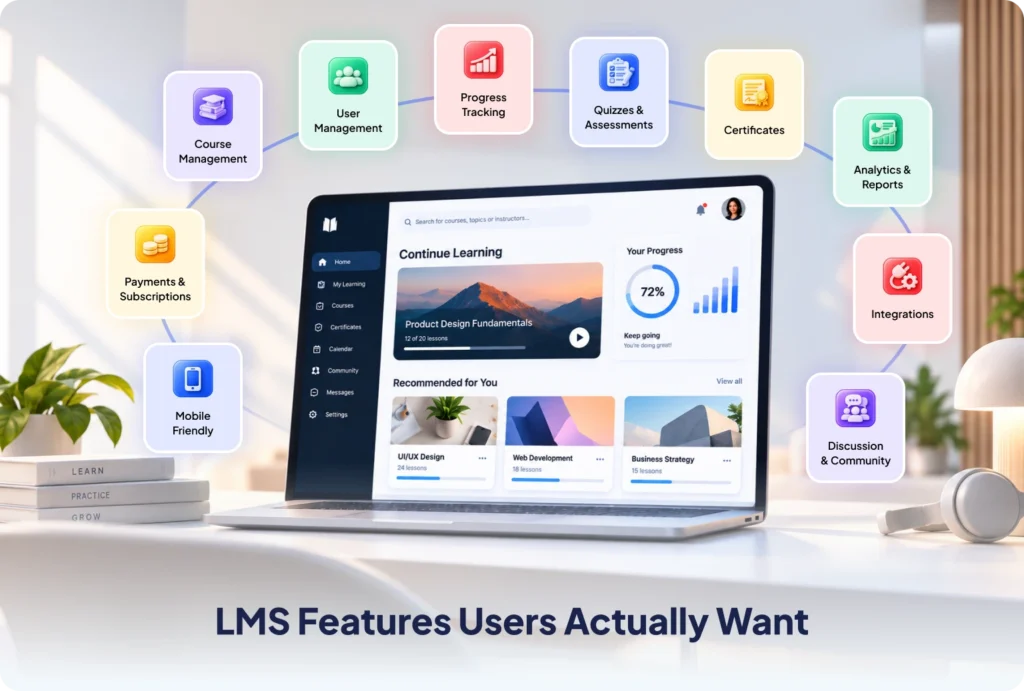
The LMS Features Your Users Actually Want
Forget the shiny stuff for a minute. Put yourself in a learner’s shoes. They want things that just work. These are the real must-haves.
- A course builder simple enough for non-techies to use.
- Clear user roles for admins, teachers, and learners.
- Quizzes, tests, and grading that save your team hours.
- Progress tracking and reports that actually make sense.
- Certificates when a course is done.
- Payments and subscriptions, if you sell learning.
- A mobile-friendly design that feels right on any screen.
- Reminders and nudges that keep people coming back.
- Clean connections to your other tools through API development services.
- Security and compliance built in, not patched on later.
Here is a small opinion that saves big headaches. Do not treat reports and reminders as afterthoughts. They are what keep learners active and keep clients renewing. Weak engagement features quietly kill good platforms.
AI Features That Turn a Good LMS Into a Great One
This is where the real gap sits. Loads of buyers want AI inside their platform. Very few tools do it well. That space is your edge.
The weak tools bolt AI on at the end. The strong ones build around it from day one. Big difference, and your users feel it.
Here are the AI features worth every dollar, framed by what they do for the learner.
- Adaptive learning paths. The platform reads each learner and shifts the content to fit their pace. No more one speed for everyone.
- An AI tutor. A smart helper answers questions day and night, so nobody gets stuck at midnight. You can power this with AI chatbot development.
- Auto content and quizzes. AI drafts lessons and test questions in minutes with generative AI development, freeing your team to teach.
- Smart grading. Fast, fair feedback with far less manual work.
- Early warnings. Analytics flag learners who might quit, so you can reach out before they do.
- Translation and voice. Speech-to-text and text to speech open your doors to more people.
Buyers now expect this. AI inside a learning tool has shifted from a bonus to a baseline. The good news is you do not need a research lab to get there. A solid build sits on proven AI and ML development services, so the smarts are real and reliable. For more ideas, see our piece on AI features every educational app needs.
A Quick Look at What a Real Build Feels Like
Picture a coaching brand with 8,000 students. Three problems were bleeding money. Their ready-made tool could not handle live classes well. Fees jumped every time they added seats. And they had no way to spot students who were about to quit.
A custom LMS fixed all three. Live classes ran smoothly. Seat fees vanished because they owned the platform. An early warning tool flagged at risk students, and the team reached out in time. Renewals climbed. That is the shape most projects take. A few sharp pains, then a platform that quietly solves them.
How to Build an AI-Powered Learning Platform, Step by Step
No fluff. This is the path that works.
- Set clear goals. Know your learners and the exact result you want.
- Pick your core features. Start lean. Build a small, useful version first.
- Map the flow. Sketch the screens before anyone writes code.
- Choose the tech stack. Match the tools to your scale and budget.
- Build the core, then the AI. Ship the base. Layer the smart features on top.
- Test it hard. Check speed, bugs, and security with real care.
- Launch and improve. Train your team, watch the data, and keep tuning.
The classic mistake is trying to build everything at once. That path burns cash and stalls. Launch small. Learn fast. Grow with proof.
The Tech Stack Behind a Strong LMS
Keep it modern and proven. A safe, common mix looks like this.
- Front end: React, Next.js, or Vue
- Back end: Node.js, Laravel, or Python
- Database: PostgreSQL, MySQL, or MongoDB
- Cloud: AWS, Azure, or Google Cloud, through cloud based application development
- AI layer: large language models, retrieval tools, and vector search
- Standards: follow SCORM and xAPI standards so courses move between systems
Pick the stack that fits your plan, not the one that is trending. A good team chooses tools you can hire for and scale with later.
US Rules You Cannot Skip: FERPA and Accessibility
This part is boring until you get sued or fined. So handle it early.
If you serve US students, you must respect FERPA student data privacy rules. And your platform should meet WCAG accessibility standards so every learner can use it. Building these in from the start is cheap. Fixing them later is slow, costly, and stressful. Smart teams bake compliance into the plan on day one.
How Long Does Custom LMS Development Take
Short answer: 3 to 9 months for most projects.
A starter build is quicker. An AI heavy, enterprise grade platform takes longer, because AI needs data work and careful testing. For a closer look, see our guide on how long AI development takes.
Need it sooner? Trim the first version. Ship the core. Roll out the rest in phases.
Mistakes That Wreck LMS Projects
A few traps sink good budgets. Dodge these and you are halfway to a win.
- Chasing every feature. Scope sprawl is the number one killer. Start small.
- Treating AI as decoration. If AI does not help the learner, skip it.
- Ignoring mobile. Most learners study on a phone. Design for that first.
- Skipping compliance. FERPA and accessibility are not optional in the US.
- Picking the cheapest bid. The lowest quote often becomes the priciest project once rework piles up.
How to Choose an Education Software Development Company
The wrong partner is the most expensive choice you can make. So vet them hard.
Look for these.
- Real education or edtech work in their portfolio
- Proven AI skills, not just buzzwords
- Clear, upfront pricing with no fog
- Steady communication that fits your time zone
- Support after launch, not a disappearing act
Our guide on how to choose a software development company digs deeper. If you need skilled people fast, you can also hire a dedicated development team in the USA, and the cost to hire dedicated developers guide shows what to budget.

Why Teams Pick Auspicious Soft for Education Software Development
Auspicious Soft builds custom learning platforms that scale. Founded in 2018, with teams in India and the USA, the company ships web platforms, custom software, and AI tools for startups and large brands alike.
What you get is simple. Honest pricing. A dedicated team that stays with you. And full support from first idea to launch and beyond. See the full education software development offer, browse the wider software development services, or look through our software development case studies to see the work.
FAQs
Q: How much does it cost to build a custom LMS?
In the US, most builds run from $30,000 to $150,000 and up. The price depends on features, AI, and how many learners you expect.
Q: How long does custom LMS development take?
Usually 3 to 9 months. A starter platform is faster. An AI driven, enterprise one takes longer.
Q: What is the difference between a custom LMS and a ready made one?
A custom LMS is built for your needs, and you own it. A ready made LMS is rented, fixed, and limited. Custom wins for growth and control.
Q: Can AI be added to an LMS I already use?
Yes. You can add an AI tutor, auto grading, or adaptive paths to a platform you already run. A quick review shows what fits.
Q: Is a custom LMS worth it for a small school or business?
If you plan to grow or sell courses, yes. If you only need a tiny, short term fix, a ready made tool may do for now.
Q: What tech stack is best for LMS development?
A proven mix like React, Node.js or Laravel, a strong database, and a reliable cloud host. Add an AI layer when you need smart features.
Q: Does the platform follow US rules like FERPA?
Yes. A good build respects FERPA and accessibility rules from day one, so you stay safe and compliant.
Q: Can a custom LMS handle thousands of users?
Yes. Built on the right cloud setup, it can scale from a few hundred learners to millions without breaking.
Do not Miss Our Latest Tech Insights
Stay one step ahead in the fast-moving world of AI and technology. Add us as a Preferred Source on Google and get our latest articles, guides, and industry insights delivered straight to your search feed.