+1 740 762 6496
 +91 70189 46603


TABLE OF CONTENT
- What Are Custom AI Agents for Business
- AI Chatbot vs AI Agent: The Difference That Sets Your Budget
- Why Building AI Agents in 2026 Is Cheaper Than It Was
- Three Ways to Build AI Agents: Choose Your Path First
- How to Build Custom AI Agents for Business: 9 Steps
- The Four Layers Inside Every Reliable AI Agent
- AI Agents for Small Businesses: The Budget Myth Is Dead
- Custom AI Agent Development Cost in 2026
- The ROI Math You Can Run Before You Call Anyone
- AI Agent Security: The Section Everyone Skips
- How to Choose an AI Agent Development Company
- Real Use Cases by Industry
- What This Looks Like in Production
- Mistakes That Kill AI Agent Projects
- Why Choose Auspicious Soft to Build Your AI Agent
- FAQs
Overview
- An AI agent plans, decides, and acts. A chatbot only answers. That gap sets your budget.
- Start with one narrow, boring, repeatable task. Broad agents ship late and get canceled.
- 2026 changed the economics. Model prices fell hard, and MCP turned tool integration into a standard instead of a custom project every time.
- The build price is not the budget. Initial development runs roughly 25 to 35 percent of three year total cost.
- AI agents for small businesses work now. A single well scoped agent starts near $15,000.
- Guardrails come first, not later. Permission limits and audit logs are what separate a useful agent from a liability.
- Measure from week one. Task completion rate, escalation rate, hours saved. No metric, no project.
AI Summary:
To build a custom AI agent for your business, pick one repetitive task, map how a person does it today, choose your build path (no code, framework, or fully custom), connect the agent to your data and tools through APIs or MCP, add guardrails and human approval steps, run it in shadow mode, then deploy with monitoring. A focused agent takes 6 to 10 weeks. Budget $15,000 to $60,000 for a first production agent, and plan around the three year cost, not the build price.
Auspicious Soft has built software for US startups and enterprises since 2018. What follows is the process our engineers use, including the parts vendors usually leave out of the pitch deck.
Most AI agent projects do not fail in production. They fail in the first meeting, when nobody can say out loud what the agent is supposed to do.
What Are Custom AI Agents for Business
An AI agent is software powered by a language model that takes a goal, makes a plan, uses tools, and finishes the task on its own.
Anthropic, whose engineering team publishes some of the most respected guidance in this field, settled on a definition worth remembering: language models autonomously using tools in a loop. No hype in that sentence. That is the whole idea.
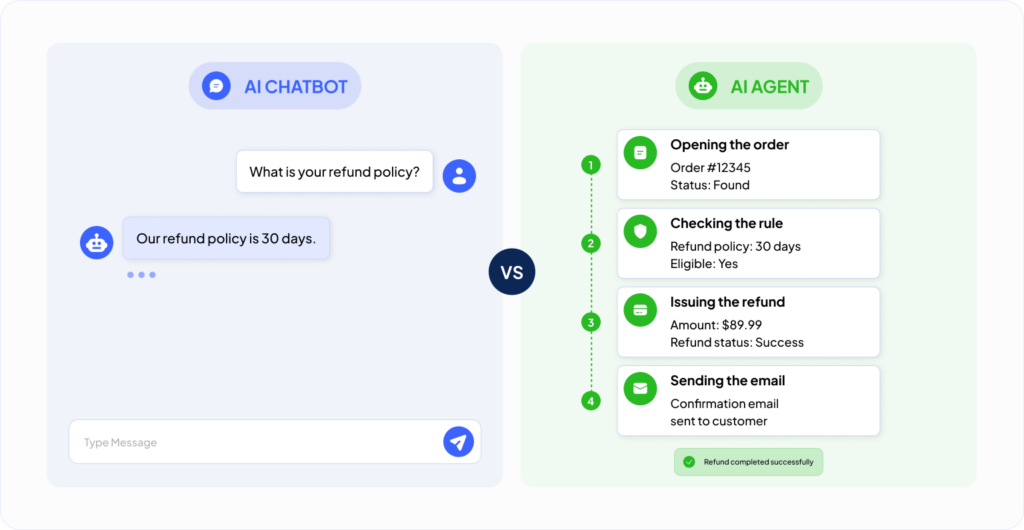
Here is what it looks like in practice. A chatbot answers a question about your refund policy. An agent reads the refund request, opens the order in your system, checks it against your rules, issues the refund, updates the ticket, and emails the customer. One talks. One works.
A custom agent is shaped around your business. Your data. Your rules. Your systems. That is where the value lives, and it is also why this is engineering work rather than a weekend setup.
AI Chatbot vs AI Agent: The Difference That Sets Your Budget
People mix these up constantly. It leads to wrong quotes, wrong timelines, and disappointed teams.
| Feature | AI Chatbot | Custom AI Agent |
|---|---|---|
| Core Job | Answers questions | Completes tasks |
| Memory | Usually resets each session | Keeps context and history |
| Tool Access | None or very limited | CRM, email, database, calendar, payments |
| Decision Making | Follows a script | Plans steps and adapts |
| Failure Mode | A wrong answer | A wrong action, which costs more |
| Typical Build Cost | $3,000–$15,000 | $15,000–$150,000 |
Our position is blunt, and it costs us work to say it. If you only need answers to common questions, buy a chatbot tool and stop reading. Do not pay agent prices for chatbot work. But the moment a task crosses two or more systems, a chatbot will frustrate everyone involved, and a well built agent will change how the team spends its week.
Why Building AI Agents in 2026 Is Cheaper Than It Was
Most guides on this topic describe a world that no longer exists. Three shifts changed the cost of building custom AI agents for business, and every one of them works in your favor.
Model prices collapsed. Running an agent used to be the scary line item on the spreadsheet. Inference costs have dropped sharply year over year, and small fast models now handle most routine steps for a fraction of what frontier models charge. Cost control today is mostly about routing: cheap models for simple steps, strong models for judgment.
MCP turned integrations into plumbing. Model Context Protocol arrived in late 2024 as an open standard for connecting AI models to tools and data. OpenAI, Google DeepMind, and Microsoft all adopted it. In December 2025 it moved under Linux Foundation governance, making it vendor neutral. Thousands of public servers now exist. In plain terms, connecting an agent to Slack, GitHub, a database, or a help desk used to be a custom build every single time. Often it is not anymore.
Agents started talking to each other. The Agent to Agent protocol reached version 1.0 in 2026 with backing from more than 150 organizations, including AWS, Microsoft, Google, and Salesforce. That matters the moment you want a second agent, because it will not need custom glue to work alongside your first.
The practical result: an agent that cost $80,000 to build in 2024 frequently costs less today, and the integration work that used to eat the budget keeps shrinking.
Three Ways to Build AI Agents: Choose Your Path First
Before any steps, pick your lane. This single decision drives cost, timeline, and how far the agent can grow before it needs a rebuild.
| Path | Best For | Time to First Version | Realistic Cost | Where You Hit the Wall |
|---|---|---|---|---|
| No-Code Platforms | Testing an idea, simple internal workflows | Hours to days | $50–$500/month | Custom logic, compliance, deep integrations |
| Frameworks | Technical teams wanting control without starting from zero | Days to weeks | $15,000–$60,000 (build) | Scaling and governance require real engineering |
| Fully Custom | Regulated data, proprietary workflows, product features | 2–5 months | $60,000–$150,000+ | Mostly budget and internal readiness |
Here is advice that loses us projects, offered anyway. Most businesses should prototype on a no code tool first. Spend two weeks proving the workflow deserves automation at all. Then bring in a development team for the version that has to survive real users.
Teams that skip the prototype almost always rewrite the requirements halfway through the build. That is where budgets break, relationships sour, and projects join the 40 percent Gartner is counting.
How to Build Custom AI Agents for Business: 9 Steps
This is the process Auspicious Soft runs on client work.
Step 1: Pick One Painful, Boring, Repeatable Task
Do not start with “we want AI.” Start with “our team burns 15 hours a week retyping quote requests from email into the CRM.”
Strong first candidates share three traits. They happen often. Their rules can be written down. And a mistake is annoying rather than catastrophic. Never hand a first agent unsupervised control over legal decisions, medical advice, or large payments.
Step 2: Map the Human Workflow on Paper
Write down every step a person takes today. Every click. Every check. Every strange exception nobody documented because Sharon just knows.
This becomes your blueprint. Skip it and you will build the agent twice. That is not a warning, it is a pattern, and we have seen it firsthand on projects that arrived for rescue after another team built version one.
Step 3: Lock In Your Build Path
Use the table above. Decide now, in writing, with a budget attached. Switching paths at week six is the most expensive mistake available in this category.
Step 4: Choose Your Models, Plural
You have strong options in 2026. Claude, GPT, and Gemini all ship capable models through APIs. Open source models such as Llama work well when data has to stay on your own servers.
| Situation | Sensible Choice | Why |
|---|---|---|
| General reasoning and tool use | Claude or GPT-tier models | Best planning quality, fast to integrate |
| Strict privacy or data residency rules | Open-source, self-hosted models | Data never leaves your infrastructure |
| High-volume simple tasks | Small, fast models | Often 10× cheaper per call |
| Long document processing | Large-context models | Read full files without chunking headaches |
The professional move is mixing them. Send classification and formatting to a cheap model. Send planning and judgment to a strong one. Clients regularly cut monthly bills roughly in half this way with no visible drop in quality.
Step 5: Connect Your Data and Tools
An agent with no system access is a clever intern locked out of the building.
This step wires the agent into your CRM, help desk, database, calendar, and email. Two approaches dominate:
- MCP servers for anything with an existing connector. Standardized, faster, less code to maintain forever.
- Direct API integration for internal systems and anything unusual.
This is where projects get genuinely hard, and where experience earns its fee. Clean, well documented APIs make agents reliable. Messy ones make agents guess. If your systems need groundwork first, that is exactly what our API development services team handles before any agent work begins.
For company knowledge, most agents use retrieval augmented generation. In plain words: the agent looks up facts in your real documents before answering, instead of relying on whatever the model happens to remember.
Step 6: Add Guardrails and Human Checkpoints
This is the strongest opinion in this guide, and the section competitors keep thin.
Every agent Auspicious Soft ships includes four controls:
- Action limits. The agent refunds up to $100 on its own. Above that, a human approves.
- Scope limits. It discusses orders. It does not offer medical, legal, or financial advice. Ever.
- Memory rules. What it stores, for how long, and what gets deleted on request.
- Audit logs. Every action recorded with inputs and outputs, so you can prove what happened.
Anthropic’s engineering team makes the same argument in their guidance on building effective agents, recommending checkpoints where agents pause for human review before anything irreversible, such as approving a payment or deleting data. That matches what we see in production, every time.
Autonomy is a dial, not a switch. Start it low. Turn it up as the agent earns trust on specific task types.
Step 7: Run It in Shadow Mode
Internal testing catches maybe half your problems. Real users find the rest, because real users misspell things, change their minds, and ask questions nobody scripted.
Shadow mode means the agent drafts every action and a human sends it. Two to four weeks of that gives you a real error rate instead of a hopeful one. Cheapest insurance in the whole project.
Step 8: Deploy With Observability From Day One
You cannot fix what you cannot see. Before launch: tracing on every agent run, alerts on failure rate and cost per task, and a clear escalation path to a human.
Industry research keeps surfacing the same gap. Most companies struggle to monitor agents after deployment, and only a minority tie evaluation to actual business metrics. Do not join them. Observability is not a phase two item, and any vendor who calls it one is telling you something important about how they work.
Step 9: Measure, Then Tune Monthly
Track three numbers from launch day:
- Task completion rate. What share finishes without a human?
- Escalation rate. How often does it hand off, and why?
- Value delivered. Hours saved, tickets closed, leads answered inside five minutes.
Review weekly for two months, then monthly. Agents drift as your business changes. Budget for tuning the way you budget for hosting.
The Four Layers Inside Every Reliable AI Agent
Strip away the marketing and a good agent has four layers. Keeping them separate is what makes it fixable six months later.
| Layer | What It Does | What Breaks When It Is Weak |
|---|---|---|
| Knowledge | Retrieves facts from your documents and databases | Confident but incorrect answers |
| Reasoning | Plans steps and decides what comes next | Loops, stalls, and poor decisions |
| Action | Calls tools and writes to business systems | Wrong records updated, silent failures |
| Control | Manages permissions, approvals, logging, and limits | Legal, compliance, and security failures |
Blur these together and nobody can tell whether a bad outcome came from bad retrieval, bad reasoning, or a plain bug in the action code. Ask any vendor to show you these four boundaries in their architecture diagram. If they cannot, keep looking.
AI Agents for Small Businesses: The Budget Myth Is Dead
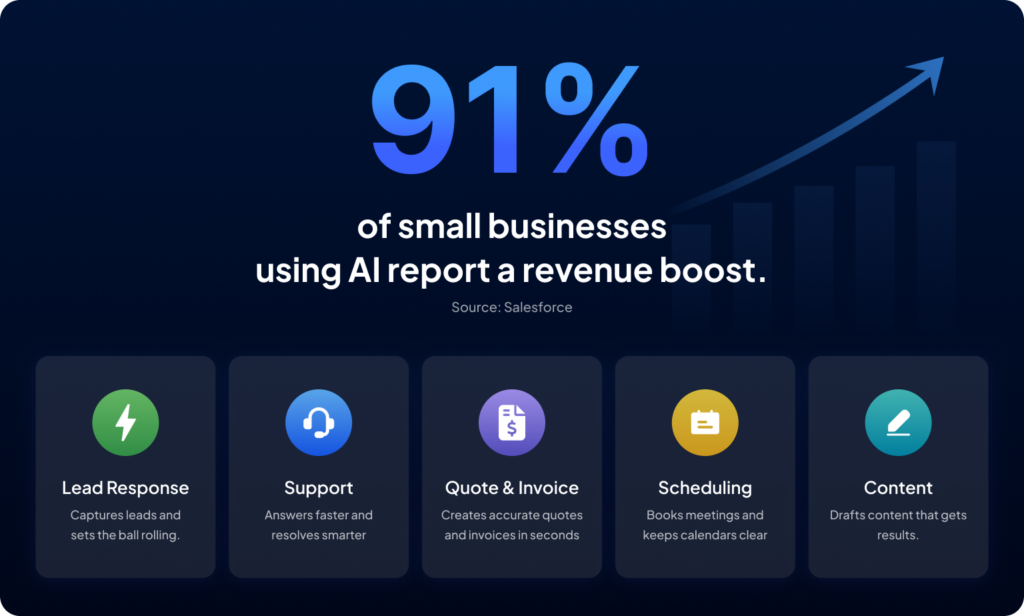
Agents are not an enterprise only technology anymore. Salesforce surveyed 3,350 leaders of businesses with 200 employees or fewer and found that 91 percent of small and medium businesses using AI say it boosts revenue.
AI agents for small businesses often return value faster than enterprise deployments, for an obvious reason. The workflows are simpler, the approval chains are shorter, and the wins are visible in the first month.
Where small teams get real value:
- Lead response agent. Replies to website inquiries in seconds, qualifies them, books the call. Speed of first reply is one of the strongest predictors of closing.
- Support agent. Absorbs the 40 to 60 percent of tickets that repeat forever.
- Quote and invoice agent. Reads requests, drafts quotes, chases unpaid invoices politely and relentlessly.
- Scheduling agent. Books, reminds, reschedules. No phone tag.
- Content agent. Drafts posts and emails in your voice, with a human approving before anything ships.
One agent doing one job well beats five agents doing five jobs badly. For a small team that is not a suggestion, it is the entire strategy.
Custom AI Agent Development Cost in 2026
Straight numbers, based on real project scoping.
| Agent Type | Build Cost | Typical Timeline |
|---|---|---|
| Prototype / Proof of Concept | $8,000–$20,000 | 2–4 weeks |
| Single Workflow Production Agent | $15,000–$60,000 | 6–10 weeks |
| Multi-Tool Agent with Memory & RAG | $60,000–$120,000 | 3–5 months |
| Multi-Agent System with Compliance Controls | $120,000–$300,000+ | 5–9 months |
Now the part most vendors skip until the contract is signed. The build is not the budget.
| Ongoing Cost | Typical Range |
|---|---|
| Model API Usage | $100–$5,000/month |
| Hosting & Infrastructure | $200–$2,000/month |
| Annual Maintenance | 15–30% of the original build cost per year |
| Human Oversight | 0.25–1 full-time employee (FTE), depending on scale |
Independent cost analyses keep landing on the same benchmark: initial development is roughly 25 to 35 percent of three year total cost. So when a quote says $80,000, your real three year planning number sits closer to $230,000 to $320,000.
An agency that shows you a build price and stops there is either inexperienced or hoping you will not ask. The full picture lives in our detailed breakdown of agentic AI development cost.
The ROI Math You Can Run Before You Call Anyone
Do this on a napkin before requesting a single quote.
Step 1. Hours the task consumes each week, times loaded hourly cost, times 52. That is your current annual cost.
Step 2. Multiply by a realistic automation rate. Use 60 percent, not 100. Agents escalate, and they should.
Step 3. That is your annual saving. Compare it against build cost plus twelve months of running cost.
Worked Example: A support task eats 25 hours a week at $30 loaded cost, so $39,000 a year. At 60 percent automation the agent saves about $23,400 annually. Against a $30,000 build and $6,000 of annual running cost, payback lands near month 18 and improves every year after, because the build cost does not repeat.
If your numbers cannot clear payback inside 24 months, choose a different task. That is not pessimism. That is the exact filter separating projects that survive from projects that get quietly shelved.
AI Agent Security: The Section Everyone Skips
Agents carry risks ordinary software does not, because agents take actions based on text they read. Text can lie to them.
Threats worth knowing:
- Prompt injection. Malicious instructions hidden inside a document, email, or web page the agent reads. It follows them because it cannot always tell data from orders.
- Tool poisoning. Harmful instructions buried in a tool’s own description. Testing has shown these succeed at alarming rates when agents run with automatic approval enabled.
- Over permissioned agents. The most common real world failure. Write access to everything got granted during development because it was faster, and nobody rolled it back.
- Memory poisoning. Bad information gets stored once, then repeated with total confidence for months.
Controls that actually work:
- Least privilege on every tool. Read only unless writing is required.
- Human approval on anything irreversible.
- Treat all retrieved content as untrusted input, never as instructions.
- A full audit trail you can replay decision by decision.
- Regular red team testing against your own agent, not just the vendor’s demo.
OWASP maintains a free reference on exactly this. Anyone deploying an agent that touches customer data should read the OWASP guide to agentic AI threats and mitigations before launch rather than after.
How to Choose an AI Agent Development Company
Most buyers evaluate vendors on portfolio and price. Both matter less than these six questions.
- Can they name what your agent will not do? Vendors who only describe capabilities have not thought about scope. Scope is the project.
- Will they show you the four layer architecture? Knowledge, reasoning, action, control. If the answer is a slide about “our AI platform,” keep looking.
- What is their escalation design? Ask how a user reaches a human. If there is no clean answer, your customers will find that out for you.
- Do they quote the three year cost or just the build? Covered above. This one question filters the field fast.
- Who owns the code and the prompts? Get this in writing. Some vendors keep the orchestration layer, which means you cannot leave.
- What happens in month four? Agents drift. Ask who tunes it, how often, and what that costs.
Any agency that answers all six comfortably has shipped agents before. Any agency that gets uncomfortable on question four or five is telling you something useful.
Real Use Cases by Industry
- Healthcare. Intake agents that gather patient details, verify insurance, and schedule visits. Compliance shapes every decision here, as our work on HIPAA compliant EHR development shows.
- Real estate. Agents that answer property questions instantly and book viewings while the lead is still warm. See our approach in real estate software development.
- Fitness. Agents that build plans, send nudges, and cut member churn. More in fitness software development.
- Ecommerce. Order tracking, returns, and product questions handled end to end.
- Education. Tutoring agents that adapt to each learner’s pace. Explore our education software development work.
Domain specific agents are outgrowing general purpose assistants in measurable business impact, and the reason is simple. The winning agents are not the smartest. They are the ones that know one business deeply.
What This Looks Like in Production
Two systems Auspicious Soft built and shipped, with published numbers:
Black Therapy, a telehealth platform, uses AI matching to connect patients with the right therapist in under two minutes on a fully HIPAA compliant system, with a 39 percent efficiency gain for the practice. Before that, matching took days.
Werover, an IoT turbine monitoring platform, eliminated duplicate alerts completely and improved notification relevance by 50 percent by applying intelligent filtering to real time sensor data. Engineers stopped ignoring their own alarms, which is the entire point of an alarm.
Both share a pattern worth copying. Neither started as an AI project. Both started as a specific operational problem with a number attached. That order works. The reverse almost never does.
See the full set in our case studies.
Mistakes That Kill AI Agent Projects
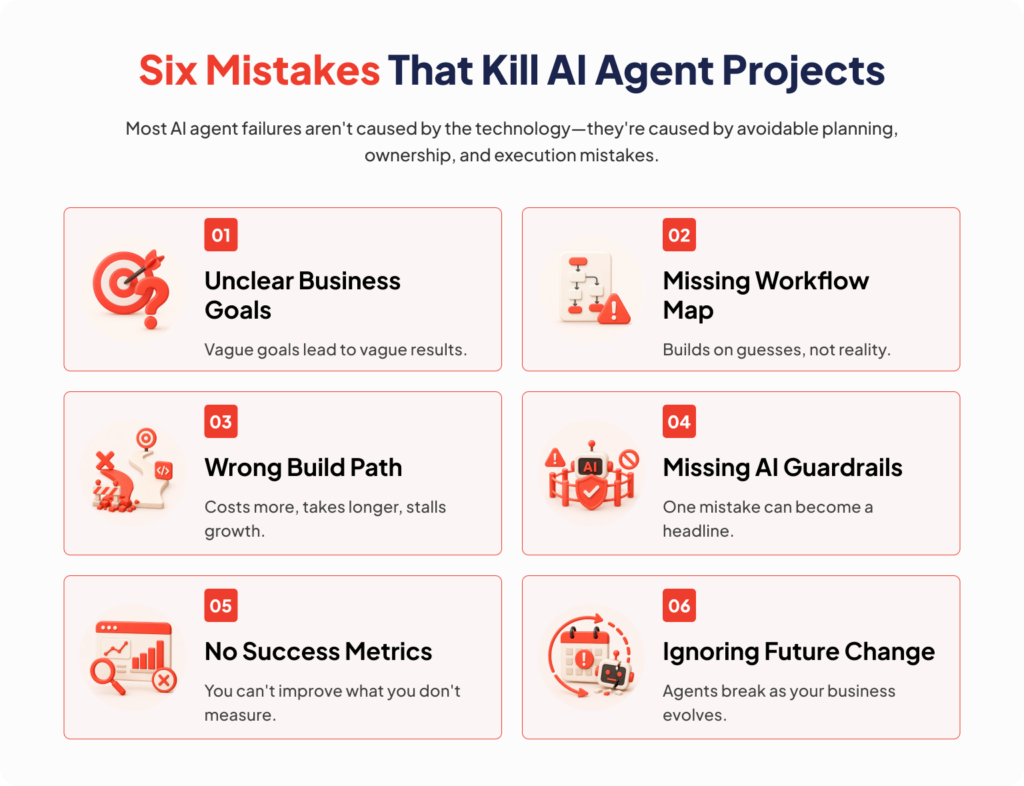
- Building for the demo, not for Monday. A demo impresses a boardroom. Production survives angry customers, typos, and edge cases nobody scripted.
- No named owner after launch. An agent is a team member. Someone reviews its work weekly or it quietly rots.
- Feeding it stale data. Outdated documents produce outdated answers delivered with total confidence. The confidence is the dangerous part.
- No escalation path. Users forgive an agent that says “let me get a human.” Nobody forgives being trapped in a loop.
- Chasing full autonomy on day one. Trust gets earned in production. It never gets promised in a proposal.
- Budgeting the build and ignoring year two. The most common financial mistake in this entire category.
Why Choose Auspicious Soft to Build Your AI Agent
Auspicious Soft is a custom software development company founded in 2018, with 200 plus delivered projects, 40 plus engineers, and clients across the USA. Our team builds agents as part of complete products, alongside mobile app development services, web development, and full AI and ML development services.
What that means in practice: one team owns the agent, the app around it, the APIs beneath it, and the support after launch. No handoffs. No finger pointing at 2am when something breaks. We work US hours, offer fixed price contracts on well defined scopes, and you can extend capacity with a dedicated remote development team as the roadmap grows.
FAQs
Q: What is a custom AI agent for business?
A custom AI agent is software built specifically for your company that uses AI to plan and complete tasks on its own. It connects to your tools, follows your rules, and works with your data, unlike generic AI products that know nothing about how your business runs.
Q: How much does it cost to build a custom AI agent in 2026?
A prototype costs $8,000 to $20,000. A single workflow production agent runs $15,000 to $60,000. Multi tool agents with memory reach $60,000 to $120,000, and multi agent systems with compliance controls start around $120,000. Plan for annual maintenance at 15 to 30 percent of the build cost.
Q: How long does it take to build an AI agent?
A focused single task agent takes 6 to 10 weeks including testing. Agents with several integrations take 3 to 5 months. Multi agent systems in regulated industries take 5 to 9 months.
Q: Are AI agents worth it for small businesses?
Yes, when scoped to one repetitive task. Salesforce research found 91 percent of small and medium businesses using AI report a revenue boost. Payback typically lands within 12 to 24 months, and faster for lead response work where speed directly affects revenue.
Q: What is the difference between a chatbot and an AI agent?
A chatbot answers questions. An AI agent completes tasks. Agents plan multiple steps, use tools such as your CRM and email, remember context across sessions, and take real actions inside your systems.
Q: Do I need to train my own AI model?
Almost never. Most business agents use existing models connected to your own data through retrieval. Training a model from scratch costs far more and rarely improves business outcomes.
Q: Can an AI agent connect to my existing software?
Yes. Agents connect through APIs, and increasingly through MCP, an open standard supported by every major AI provider. CRMs, help desks, calendars, payment systems, and databases are all common connections.
Q: Are custom AI agents secure for business use?
They are secure when built with least privilege access, human approval on irreversible actions, audit logging, and treatment of all retrieved content as untrusted input. Unsafe agents are almost always agents built without these controls rather than a flaw in the technology.
Q: Which AI model is best for business agents in 2026?
There is no single winner. Claude and GPT lead on reasoning and tool use, Gemini fits Google ecosystems, and open source models such as Llama suit strict privacy needs. Experienced teams mix models, routing cheap steps to small models and hard steps to strong ones.
Q: Will AI agents replace my employees?
In practice agents replace tasks, not people. They absorb repetitive work so your team handles judgment, relationships, and exceptions. Companies that present agents as helpers see far better adoption than companies that present them as replacements.
Q: What is MCP and why does it matter?
MCP, or Model Context Protocol, is an open standard released in late 2024 for connecting AI models to tools and data. Anthropic, OpenAI, Google, and Microsoft all support it, and it now sits under Linux Foundation governance. It matters because it turns tool integration from a custom build into a standard connection, which lowers your cost.
Q: How do I know if my workflow suits an AI agent?
Good fits happen often, follow rules you can write down, involve two or more systems, and produce mistakes that are recoverable. Poor fits are rare, judgment heavy, or carry serious legal or safety consequences when handled incorrectly.
Q: How do I choose an AI agent development company?
Ask what the agent will not do, ask to see the architecture layers, ask how users reach a human, ask for the three year cost rather than the build price, confirm in writing who owns the code and prompts, and ask who tunes the agent in month four.
Do not Miss Our Latest Tech Insights
Stay one step ahead in the fast-moving world of AI and technology. Add us as a Preferred Source on Google and get our latest articles, guides, and industry insights delivered straight to your search feed.