+1 740 762 6496
 +91 70189 46603


TABLE OF CONTENT
- Top Mistakes to Avoid in Mobile App Development for Business Growth
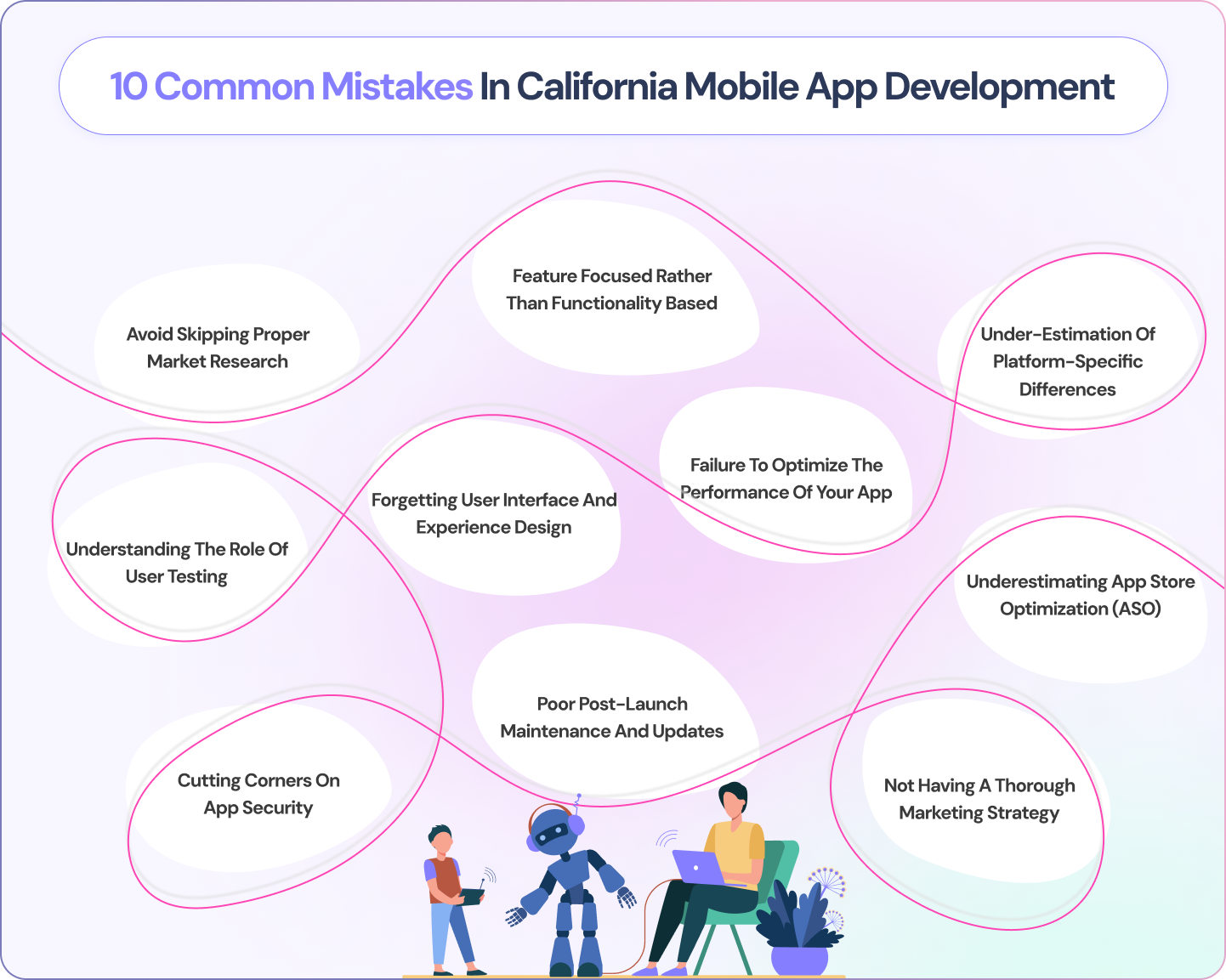
- 1. Avoid Skipping Proper Market Research
- 2. Feature Focused Rather Than Functionality Based
- 3. Under-estimation of platform-specific differences
- 4. Understanding the Role of User Testing
- 5. Forgetting User Interface and Experience Design
- 6. Failure to optimize the performance of your app
- 7. Cutting Corners on App Security
- 8. Poor post-launch maintenance and updates
- 9. Underestimating App Store Optimization (ASO)
- 10. Not Having a Thorough Marketing Strategy
- Mobile App Development Mistakes Cost & Impact Table
- Conclusion
- FAQs
Overview
- Skipping market research → Define your audience, study competitors before building.
- Feature overload vs. functionality → Launch an MVP, add features based on real feedback.
- Ignoring platform differences → Follow Apple/Google design guidelines or build native apps per platform.
- Skipping user testing → Run early beta testing to catch usability issues before launch.
- Neglecting UI/UX design → Invest in professional design for intuitive navigation and retention.
- Failing to optimize performance → Minimize load times, data use, and memory consumption; test across devices.
- Cutting corners on security → Use encryption, secure APIs, and strong authentication to avoid breaches and fines.
- Poor post-launch maintenance → Treat the app as an ongoing product with a regular update schedule.
- Underestimating ASO → Optimize app store titles, keywords, and screenshots for discoverability.
- No marketing strategy → Combine social media, content marketing, influencer partnerships, and in-app promotion.
AI Summary:
Top Mistakes to Avoid in Mobile App Development for Business Growth” by Auspicious Soft outlines 10 common pitfalls businesses (especially in California) make when building mobile apps, and how to fix each: (1) skipping market research — solved by defining your audience and analyzing competitors; (2) overloading features instead of focusing on functionality — solved by launching an MVP and iterating on user feedback; (3) ignoring platform-specific differences between iOS and Android — solved by following Apple’s Human Interface Guidelines and Google’s Material Design; (4) skipping user testing — solved by running beta groups early and often; (5) neglecting UI/UX design; (6) failing to optimize performance — slow apps get uninstalled; (7) cutting corners on security — risking data breaches and regulatory fines; (8) poor post-launch maintenance; (9) underestimating App Store Optimization (ASO); and (10) lacking a marketing strategy.
As firms continue to use mobile technology in reaching their customers and streamlining their operations, mobile application development has become absolutely integral for the firm’s future. While attempting to be at the edge of tech-savvy regions such as California, consumers look for flawless, high-quality mobile experiences. However, most businesses end up with costly failures concerning mobile app development in California, which subsequently negatively impacts user satisfaction, engagement, and growth.
77% of apps are abandoned after first use (Google). 42% of startups fail due to no market need. Apps that avoid these top development mistakes have 3x higher Day-30 retention rates than industry average.
This paper shall reflect on the most common mistakes of businesses regarding California app development, and the ways to avoid them in order to secure successful launch and people being happy and satisfied in the long run.
1. Avoid Skipping Proper Market Research
Skipping market research is the single most expensive mistake in mobile app development — not because the research costs money, but because building without it wastes an entire development budget on assumptions that turn out to be wrong. CB Insights studied 300+ startup failures and found that 42% failed because there was no market need for their product. Every dollar spent on market research before development begins saves an estimated $10-30 in development costs by identifying invalid assumptions before they become built features. In 2026, market validation is faster and cheaper than ever: a $300 Google Ads test, 15 user interviews via Calendly, and a Figma clickable prototype can validate your core value proposition in 2-3 weeks — before a single developer is hired.
Solution: Define your target audience, knowing their needs and pain points. Analyze competitors’ apps to see where they do something right and where they lack and enable you to innovate and add more value. This will enable you to create an app unique, relevant, and user-centered for the California market.

Don't Let These Mistakes Cost You Your Launch
Talk to developers who've helped 200+ businesses avoid these exact pitfalls — get a free app strategy review.2. Feature Focused Rather Than Functionality Based
Feature creep — the tendency to add features based on assumption rather than validated user need — is the second most common and most expensive mistake in mobile app development. The pattern is predictable: a founder lists 25 features, a developer builds them all, and the resulting app is so complex that new users cannot figure out the core value within the first session. Research shows that 80% of app features are used by less than 20% of users — meaning 4 out of 5 features in a typical app deliver less value than expected. The fix is a ruthless MVP-first philosophy: build only the one core feature that solves your users’ primary problem, launch it, and use real behavioral data to determine which additional features are worth building next.
Solution: Concentrate on basic functionalities where the user needs are solved with less effort. Launch your app with the Minimum Viable Product (MVP), providing basic functionalities and a good user experience. Collect feedback from users and iteratively add useful functionalities based on demand. This approach would ensure that your app stays easy to use, efficient, and user-centric, leading to higher engagement.
3. Under-estimation of platform-specific differences
Treating iOS and Android as identical platforms with minor cosmetic differences is a mistake that produces apps with poor reviews on one or both platforms. iOS and Android differ significantly in navigation patterns (back button behavior, gesture navigation, tab bar placement), design systems (Material Design vs Human Interface Guidelines), permission models (iOS asks permission at first use; Android can request at install), notification handling, keyboard behaviors, and hardware capabilities. Apps that violate the platform-specific design conventions their users expect receive consistently lower App Store ratings and higher uninstall rates. In 2026, even cross-platform frameworks like Flutter and React Native provide platform-adaptive widgets specifically to address these differences — teams that ignore them are choosing poor UX deliberately.
Solution: As part of the way, create your app according to platform’s guidelines, for example, Apple’s Human Interface Guidelines for iOS and Google’s Material Design guidelines for Android. You could engage a developer who specializes in cross-platform solutions or develop native apps designed for every platform with all the end goodies to provide a seamless experience to users across all devices.
4. Understanding the Role of User Testing
Developer blindness — the inability to see your own app’s usability problems after months of building it — is why user testing is not optional for any app that intends to succeed. The developer who built the onboarding flow cannot see that a new user does not understand what the app is for after the first screen, because the developer already knows. User testing with 5-8 people from your target demographic consistently reveals 80% of critical usability issues (Nielsen Norman Group research). In 2026, remote user testing via UserTesting.com, Maze, or Lookback can be conducted for $50-200 per session, making professional usability testing accessible to any app project regardless of budget. Apps that skip user testing before launch have 2.4x higher Day-1 uninstall rates than tested counterparts.
Solution: Try out early and often by user testing. Beginning with small beta groups of individuals gather feedback on usability and design, and use such points as a basis for continuous improvement of your app so that it will become user friendly and work flawlessly. You would, at that point, identify issues that would need to be addressed before end users and provide them with a smoother and more reliable experience.
5. Forgetting User Interface and Experience Design
Developer blindness — the inability to see your own app’s usability problems after months of building it — is why user testing is not optional for any app that intends to succeed. The developer who built the onboarding flow cannot see that a new user does not understand what the app is for after the first screen, because the developer already knows. User testing with 5-8 people from your target demographic consistently reveals 80% of critical usability issues (Nielsen Norman Group research). In 2026, remote user testing via UserTesting.com, Maze, or Lookback can be conducted for $50-200 per session, making professional usability testing accessible to any app project regardless of budget. Apps that skip user testing before launch have 2.4x higher Day-1 uninstall rates than tested counterparts.
Invest in professional UI/UX design to make your application intuitive and appealing to the user. A good UI/UX design will make it easy for the user to navigate around your application, accomplish his tasks, and enjoy his experience. Therefore, with such high competition in California, partnering with a mobile app development company that places premium value on excellent UX and UI design will make your application stand out and give you increased user retention.
6. Failure to optimize the performance of your app
A slow, laggy app can frustrate users and harm your business. Today’s users expect fast, responsive apps and often uninstall or leave negative reviews when these expectations aren’t met. This issue is especially relevant in competitive markets like California, where IT companies must meet high user expectations to stand out.
Solution: Focus on performance optimization by minimizing loading times, reducing data consumption, and minimizing memory usage. Test the app in different devices to ensure they are efficient and stable. Collaborating with a reliable mobile app development company in California that has previously done work in the area of performance optimization helps ensure smooth and speedy experiences for the users.
7. Cutting Corners on App Security
Security is the necessary feature of the digital lifecycle these days. Due to this, companies, while designing their apps in California, that do not evaluate security issues are exposing themselves to data breaches, user privacy issues, and regulatory fines. Security flaws damage your brand reputation and chances of losing the trust of users.
Solution: Data encryption, secure API connections, and user authentication should be incorporated into any development. Your app should be updated frequently for new security threats and regulation compliance over data protection if you’re dealing with sensitive information. Working with a mobile app development firm in California that’s keen on cybersecurity will ensure your app and user data stay safe.
8. Poor post-launch maintenance and updates
No app is ever really “done” after a public launch. Apps require regular maintenance to squelch bugs and add new functionality, meaning they are constantly adapting to different platform revisions. This is what so many companies misunderstand about developing an app-the belief that it is a singular project, after which the app becomes old hat and no longer supported.
Solution: A post-launch maintenance plan should be an integral part of the overall development strategy. You should have a schedule for updates including new features, performance improvements, and responding to user feedback. You want to keep your app relevant as updates add new features, improve user satisfaction, and enable you to remain competitive in the California app market.
9. Underestimating App Store Optimization (ASO)
ASO refers to the process through which your visibility is enhanced in any app store’s search results. Several businesses are not well aware of App Store Optimization (ASO) and therefore do not have much discoverability of the app and have few downloads in the California region, which is considered competitive in the marketplace.
Solution: Instead, optimize your app title, keywords, description, and screenshots so that your product is better ranked within the app store. Frequently update these factors based on what users tell you and analytics on performance. A well-executed ASO can lead to maximum visibility for your app, attract more users, and increase business growth.
10. Not Having a Thorough Marketing Strategy
It is equally important to successfully market the app that you developed. Many businesses assume that because the app is now available in the app store, people will run towards it, but such businesses often end up with very poor user-acquisition rates owing to poor marketing.
Solution: Develop a robust marketing strategy integrated with social media, content marketing, influencer partnership as well as in-app promotion. Network with a mobile app development company from California that offers marketing support or helps you source your target audience. A well-executed marketing plan is most likely to increase app visibility and downloads.
Mobile App Development Mistakes Cost and Impact Table
| Mistake | How Common | Cost to Fix (Pre-Launch) | Cost to Fix (Post-Launch) | Impact on Retention |
|---|---|---|---|---|
| Skip market research | 42% of projects | $3K–10K | Not fixable (often requires rebuild) | -60% retention |
| No MVP approach | 65% of projects | $0 (decision, not cost) | $30K–150K rebuild | -40% retention |
| Poor UX design | 71% of projects | $8K–25K | $15K–40K redesign | -35% Day-7 retention |
| No user testing | 68% of projects | $500–2K | $10K–50K fixing discovered issues | -45% completion rate |
| Skip performance testing | 55% of projects | $2K–5K | $20K+ refactoring | -30% Day-30 retention |
Conclusion
Business in California designing an app, therefore needs to avoid common mistakes of app development by tapping into the mobile technology. Deep research on the target market, focus on core functionalities, investment in UI/UX design and performance with security can aid the business in developing a growth-oriented, customer-loyalty-driven, competitive advantage app.
Partnering with the right mobile app development company in California will help get over the said problems for you, and your app will be built in such a manner as to provide long-term success. In order to avoid those pitfalls, concentrate on making a high-quality app that focuses on being user-centric, which means greater user satisfaction, retention rates, and business growth in a highly significant manner.
Don't Let These Mistakes Cost You Your Launch
Talk to developers who've helped 200+ businesses avoid these exact pitfalls — get a free app strategy review.FAQs
Q: What is the most common mistake in mobile app development?
The most common and costly mistake is skipping market research — building features based on assumptions rather than validated user needs. CB Insights data shows 42% of failed startups cite ‘no market need’ as their primary failure cause. Before spending on development, validate your idea with a landing page test, user interviews, and a clickable prototype. This costs $500-2,000 and can save $50,000-200,000 in misdirected development.
Q: Why do most mobile apps fail after launch?
77% of apps are abandoned after first use due to four main reasons: poor onboarding that does not explain the app’s value quickly enough, poor performance (crashes or slow loading), feature overload that makes the app confusing, and lack of push notification or engagement mechanics to bring users back. The apps that succeed invest heavily in Day-1 experience, performance testing, and retention loop design before launch.
Q: How can I avoid scope creep in app development?
Prevent scope creep with three practices:
- Create a detailed Product Requirements Document signed by all parties before development begins.
- Implement a formal change request process — any new feature request mid-development requires a written scope change with cost and timeline impact estimate before approval.
- Use an MVP-first approach — define the absolute minimum feature set for launch and save additional features for subsequent versions.
Q: Is user testing really necessary for app development?
Yes, user testing is one of the highest-ROI investments in app development. Nielsen Norman Group research shows that testing with just 5 users reveals 80% of critical usability issues. Remote user testing sessions via tools like UserTesting.com or Maze cost $50-200 per participant. Finding that your onboarding flow confuses users before launch costs $500. Discovering the same problem after 10,000 downloads and 3,000 1-star reviews costs far more — both financially and reputationally.
Q: How much does it cost to fix mistakes after an app launches?
Post-launch fixes are dramatically more expensive than pre-launch prevention. Fixing a UX problem discovered post-launch costs 5-10x more than addressing it during design. A fundamental architecture mistake costs 20-50x more to fix post-launch than to prevent with proper planning. A rough guide: fixing a navigation design problem pre-launch costs $2,000-5,000 in design revisions; fixing the same problem post-launch (with a live user base expecting consistency) costs $15,000-40,000 including development, testing, and communication to existing users.
Do not Miss Our Latest Tech Insights
Stay one step ahead in the fast-moving world of AI and technology. Add us as a Preferred Source on Google and get our latest articles, guides, and industry insights delivered straight to your search feed.